 Michael Hardin
 Key Takeaways
- F5 means the door interlock circuit has reported an invalid state, and the oven should not be used until it is repaired.
- The door uses two or three redundant switches that must change state in sequence; one failure is enough to stop the oven.
- If the oven ever runs with the door open, unplug it at once.
- Never tape, wedge or magnet the switches; that defeats the main protection against microwave emission.
- Do not remove the outer cabinet: the high-voltage capacitor holds a lethal charge even when unplugged.
The Bottom Line
Treat F5 and a misbehaving door as a stop sign. Unplug the oven if it ever runs with the door open, and book a technician to test the switches and latch.
A microwave that refuses to start with the door closed looks like an annoyance. It is more than that, because the door switches are the part that keeps microwave energy inside the cabinet, and when their circuit reports something impossible the oven is built to stop. Maytag microwave door switch failure shows up as a code, a light that behaves oddly or a door that needs more force, and every one of those is a reason to stop using the oven until a technician has looked at it.
| What you notice | What it points to | What to do |
|---|---|---|
| Will not start with the door closed, F5 on the display | The interlock circuit reports an invalid state | Stop using it; book a technician |
| F5 appears as the door opens or closes | Switches not changing state in the right sequence | Stop using it |
| Cavity light or turntable behaves erratically | Switch states out of sequence | Unplug and stop using it |
| Door needs force or no longer clicks | Worn or misaligned latch hooks | Stop using it; do not force the door |
| The oven runs with the door open | Interlock failure | Unplug it immediately |
What Does Maytag Microwave Door Switch Failure Look Like?
Usually like an oven that will not start for no visible reason. Our microwave F5 page describes the code as the door interlock circuit reporting an invalid state, and lists the symptoms: pressing Start produces F5 with the door apparently shut, the cavity light or turntable behaves erratically, and the fault appears at the moment the door moves.
- Start produces F5 — no cook cycle begins even though the door looks closed and latched.
- The light stays on with the door closed — or fails to light when the door opens, a sign the switches are not changing state properly.
- The turntable turns at odd times — another sign the switch states are out of sequence.
- The code appears as the door moves — the interlock switches are not changing state in the correct sequence as the latch engages.
Why Does a Microwave Have Two or Three Door Switches?
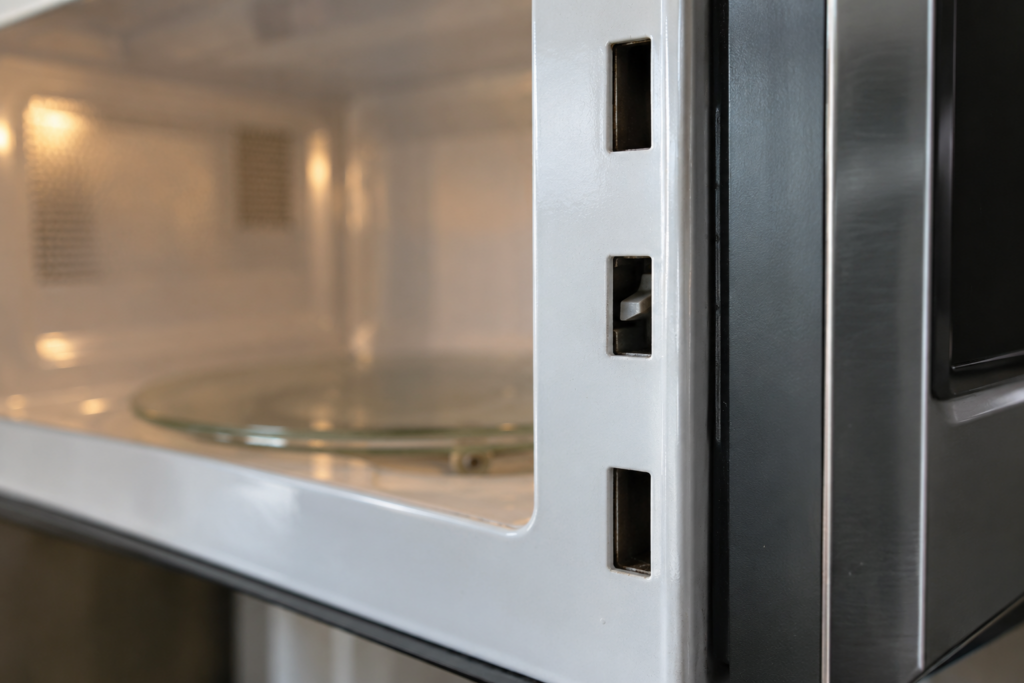
Because the safety of the door cannot depend on one switch. The F5 page says every microwave, including Maytag MMV over-the-range and countertop models, uses two or three redundant door switches that must change state in a specific sequence as the door opens and closes. If one sticks, or the latch no longer presses them in the right order, the control sees a state that should be impossible and refuses to run.
That design is why a door switch fault is a safety fault rather than a convenience one. The page notes that door switches are the single most common electrical failure in Maytag microwaves, and it ties that to a fault that can cause emission with the door open or only partially latched, which it calls a serious radiation safety hazard.
Is It Safe to Use a Microwave With a Door Switch Fault?
No. Our F5 page answers that question directly: the microwave cannot reliably confirm the door is closed, so using it risks emission with the door open or only partly latched. A power reset does not help, since F5 comes from a worn switch or a latch problem and returns the next time the door moves.
If the oven ever runs with the door open, unplug it at once. Our Maytag microwave safety guide names the door interlock as the most critical safety system on these ovens and tells you to pull the plug in that case. If you cannot reach the plug on an over-the-range unit, turn off its breaker rather than reaching behind it.
What Can You Check Without Opening the Cabinet?
Very little, which is by design, but two observations are worth making before the technician arrives. They tell you whether the problem sits in the latch or in the electrical circuit.
- Close the door slowly and listen — the page says to listen for the two or three distinct clicks that confirm the switches are engaging.
- Look at the latch hooks — cracks, deformation or wear on the plastic hooks, or a door that needs more force than before, point at the latch.
- Note whether it is constant or intermittent — an intermittent fault helps the technician narrow the cause.
- Do not remove the outer cabinet — the high-voltage capacitor stores a lethal charge even when the oven is unplugged.
The F5 page lists three causes, all marked as work for a technician: a failed interlock switch, a worn or misaligned latch, and a harness wire that has broken or been pinched. A door that has been slammed repeatedly is named as a common cause of latch misalignment.
Why You Should Never Bypass the Switches
Taping down a switch, wedging the latch or holding a magnet near it defeats the safety interlock, which is the main protection against exposure to microwave energy. Our F5 page states this plainly: do not attempt it. A bypassed oven will work, and that is exactly the danger, because it will keep running in conditions the control would otherwise refuse.
- Do not tape or wedge anything — the interlock must work as designed or not at all.
- Do not keep using an oven that sometimes starts — an intermittent fault is still a fault.
- Do not buy a switch and fit it yourself — the switches work as a set and must be tested in sequence.
Other Start Failures That Look Similar
Not every oven that will not start has a door switch problem, and it is worth separating the cases before you assume the worst. Our microwave code pages list other codes that stop an oven from starting: F1 is a touchpad or user interface fault, and F2 is a stuck key on the keypad. Neither involves the door, though both leave the oven unusable until they are resolved.
- Display shows F5 — the door circuit; stop using it.
- Display shows F2 — a key is registering as stuck, often after a spill or cleaning near the keypad.
- No code, display dark — a power or fuse problem, which is a different diagnosis.
The code is the starting point, and a technician will read it before testing anything. If the display shows F5, assume the door circuit until a technician says otherwise.
A note for over-the-range ovens. Most Maytag microwaves on this site are over-the-range MMV units, mounted above the cooktop and often plugged in behind a cabinet. That makes the safe response to a fault a little less obvious, because the plug may be out of reach. Turn off the breaker for that circuit rather than reaching behind the unit, and keep the door closed if the oven has smoked or sparked.
Our Maytag microwave safety guide lists the emergency steps in order, including pressing Stop first, keeping the door shut and ventilating the kitchen.
What Happens Next
A technician tests each switch for continuity, inspects the latch hooks and checks the harness for breaks. Replacing a failed interlock switch is the repair the F5 page expects to resolve the code. If the oven is old, our is it worth repairing a Maytag microwave guide helps you decide whether the repair is worth making.
A diagnostic visit starts from $89, and the final price is confirmed after the on-site diagnosis, with a written estimate before any work begins. Our microwave repair page lists what a visit covers. Book a visit or send us the model number and what the display shows before the technician arrives.