 Michael Hardin
 Key Takeaways
- F26 on a Maytag Bravos XL or Centennial dryer means the control board is not getting a valid closed-door signal from the door switch.
- It is not safe to keep using the dryer, because the door interlock is what stops the drum and heat when the door opens.
- A worn switch, a cracked latch or striker, and a wiring break are the three usual causes.
- dE is normal when you open the door on purpose, while F26 means the switch itself has failed.
- Replacing the latch or switch clears F26, and no special reset sequence is needed on MEDB and Bravos models.
The Bottom Line
Treat F26 as a door interlock fault and stop using the dryer. Check the latch and striker first, and call for service if a new latch does not clear it.
A Maytag dryer that refuses to start, or quits halfway through a cycle, is very often telling you the control board cannot confirm the door is closed. A Maytag dryer door switch fault shows up on the display as F26, and on the Bravos XL and Centennial dryers, the MEDB and MEDX series, that switch is the only thing standing between a closed door and a running heater. The good news is that most of the likely causes are visible without a single tool, and our Maytag dryer F26 code page has the quick reference.
| What you notice | Likely cause | Who fixes it |
|---|---|---|
| Dryer will not start at all | Worn or broken door switch, or a cracked latch | You, if the latch is accessible, otherwise a technician |
| Stops mid-cycle with F26 | Switch signal dropping out under vibration | A technician |
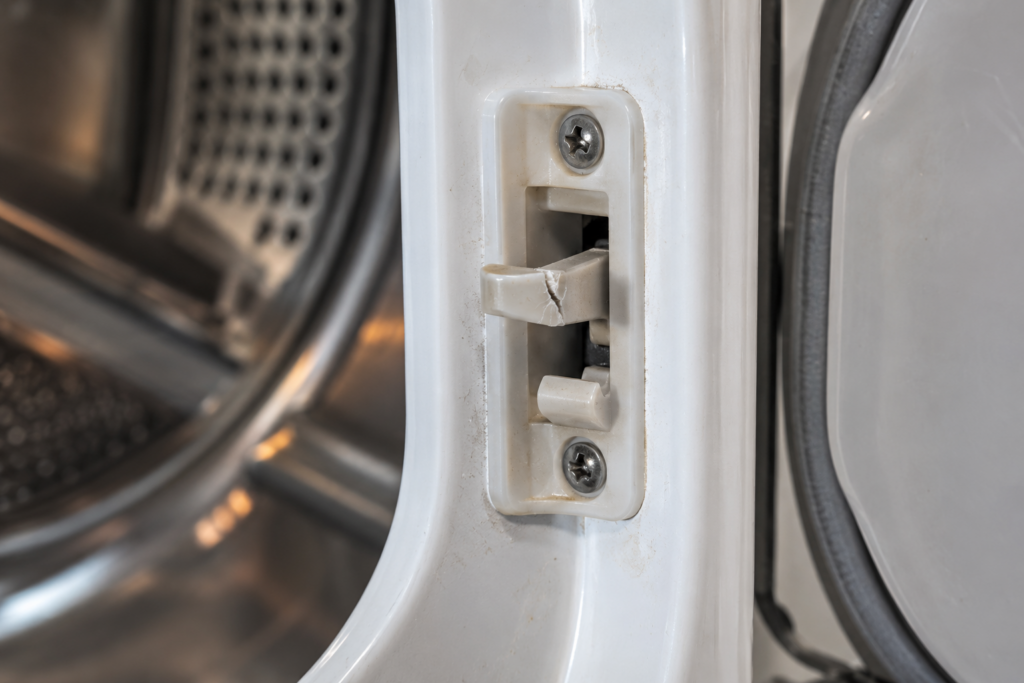
| Door feels loose and does not latch firmly | Damaged latch or striker | You, in many cases |
| Door clicks shut but dryer still refuses to start | Switch not making contact, or a harness break | A technician |
What Does F26 Mean on a Maytag Dryer?
F26 means a door switch fault: the control board is monitoring the switch and is not getting a valid closed-door signal. The switch is a small plunger that the door striker presses when the door shuts, and it is one of the most frequently actuated parts in the machine. On a family dryer run daily it sees thousands of actuations a year, so wear is the ordinary reason it fails rather than something unusual.
What makes the code confusing is that the door can look and sound perfectly shut. A solid click does not prove that the striker is pressing the plunger far enough to close the circuit, and the board only knows what the switch tells it.
- Worn or broken door switch — the plunger or its internal contacts have worn out.
- Cracked latch or striker — the plastic parts no longer push the plunger far enough.
- Wiring break to the switch — the wires have pulled free at a connector, creating an open circuit.
- Control board input problem — rare, and only worth suspecting once the switch tests good.
Is It Safe to Keep Using a Maytag Dryer With F26?
No. This site rates the answer as no, because a dryer that cannot confirm its door is closed has lost the interlock that is supposed to stop the drum and the heat when someone opens it. Operating without a working door interlock is unsafe, and the fix is a part, not a workaround.
That is why one tempting shortcut is worth naming and ruling out. Holding the door shut by hand to get a cycle going is only a diagnostic step to tell a latch fault from a switch fault, never a way to run the dryer. If the dryer starts while you press on the door, you have learned the latch or the switch is not making full contact, and both should be inspected or replaced.
How Is F26 Different From the dE Code?
dE is a door event and is normal behavior when you open the door on purpose, while F26 is a fault in the switch itself. On Bravos XL, Centennial and Maxima dryers the board watches the door signal throughout every cycle, and when it sees the door open it pauses the cycle immediately. Closing the door and pressing Start resumes it, with no reset needed.
- dE after you opened the door: expected, and nothing to repair.
- dE with the door closed: a sign the latch or switch is starting to fail, and the dryer should be used with caution.
- dE three or more times in a cycle: the door is not staying latched, which is where F26 usually follows.
- F26 on its own: the switch has stopped reporting a closed door altogether.
Our Maytag dryer dE page covers the pause-and-resume behavior, and the neighbor code F28 is a different problem, a communication failure between the two control boards, so do not assume a dead panel is a door fault.
Can You Reset F26?
Yes, but only by fixing the cause. Replacing the door switch or the latch resolves F26 on MEDB and Bravos models without any special reset sequence, and a power cycle alone will bring the code back as soon as the door signal drops again. If F26 persists after the latch and striker look intact, stop and have the switch and harness tested.
Before you call anyone, there are two checks that need no disassembly. Neither involves opening a panel.
- Close the door firmly and listen for a positive click, then open it and look at the plastic latch on the door frame and the striker on the door itself.
- Look for cracked plastic, missing tabs or a latch that moves freely when pressed, because a broken latch is often visible at a glance.
- Press Start with the door firmly closed, and if F26 still appears, try once more holding the door shut with firm hand pressure, for diagnosis only.
- Write down which of the two results you got, since the technician can use it to bring the right part.
On Bravos XL models the latch assembly is reachable from the inner lip of the front panel, and a replacement latch kit is a common homeowner repair. The switch itself sits behind the front panel, and replacing it means taking that panel off.
What the Repair Involves
A latch or striker swap is the simple end of the range, while a door switch replacement is the part that sends most owners to a technician. The switch sits behind the front panel, so reaching it means taking that panel off, testing the switch with a meter and checking the wiring at its connector before anything new goes in.
- Latch or striker replaced: usually the quickest fix, and the one a careful owner can often do.
- Switch replaced: front panel off, switch tested, connector checked, new switch fitted.
- Harness repaired: wires re-seated or spliced where they pulled free at a connector.
- Board input tested: only when a good switch still reports a fault.
Whatever is replaced, the dryer is run through a full cycle afterward to confirm that F26 does not return, and that the door stays latched throughout.
When the Dryer Needs a Technician
Call for service if replacing a latch does not clear the code, if the door will not stay latched during operation, or if the repair needs the front panel off. Wiring inspection at the switch connector and testing the control board's door-sense input are not homeowner jobs, and both come up when a good-looking switch still reports a fault.
Our Maytag dryer diagnostic codes guide places F26 beside the rest of the code family, and our common Maytag dryer problems guide covers symptoms that come without any code.
Getting It Fixed
Our Maytag dryer F26 page lists the safe checks in order, and our Maytag dryer repair service replaces the latch or the switch and tests the harness on the same visit.
A diagnostic visit starts from $89, and the final price is confirmed after the on-site diagnosis, with a written estimate before work begins. Book a visit or send us the model number and whether F26 appears at start or mid-cycle, and we will tell you what to expect.